TheReach.ai + Hostaway: Full AI Guest Communication for Property Managers
Connect TheReach.ai to Hostaway and let Sami handle guest conversations end-to-end — availability, bookings, and 24/7 support — while Hostaway manages your operations.

Turn replies into bookings
Use instant guest messaging and AI-assisted tools to protect occupancy and revenue.
Get startedHostaway is built for property managers running multi-channel operations. TheReach.ai adds the guest-facing communication layer that Hostaway doesn't provide — WhatsApp, web chat, and voice calls answered 24/7 by Sami, with live availability and booking creation flowing straight back into Hostaway.
The integration syncs availability in real time and creates reservations directly in Hostaway. No double-entry, no manual handoff.
What Hostaway + TheReach connects
Hostaway manages:
- Channel distribution (Airbnb, Booking.com, Vrbo, direct)
- Calendar and rate management
- Operational workflows and task management
TheReach adds:
- WhatsApp, web chat, and voice — answered 24/7 by Sami
- Live availability queries against Hostaway data
- Direct booking creation in Hostaway from within guest conversations
- Guest support between OTA bookings (check-in help, FAQs, maintenance intake)
- Google Review management — draft and publish responses from one dashboard
End-to-end booking flow
A guest messages your WhatsApp number asking about availability. Sami checks Hostaway, quotes rates, and confirms the booking — all without you being online. Here's how each step works:
Guest enquires via WhatsApp, web chat, or phone call.
Sami queries Hostaway for live availability and rates for those exact dates.
Sami quotes the rate and confirms if the guest wants to book.
Sami creates the reservation in Hostaway. Hostaway sends the payment request to the guest automatically.
Booking appears in Hostaway like any other reservation. Your calendar blocks, tasks trigger, everything runs normally.
Beyond bookings: 24/7 guest support
Most enquiries aren't booking requests — they're check-in questions, WiFi passwords, parking instructions, late arrivals. Hostaway doesn't handle these. Sami does, 24/7, in the guest's language, using the knowledge base you configure per property.
For property managers running 10+ properties through Hostaway, this is the operational gap that scales poorly with human staff. Sami handles the same volume at 3am in August as it does on a Tuesday in February — without overtime, without inconsistency.
Setup guide: two fields, under 3 minutes
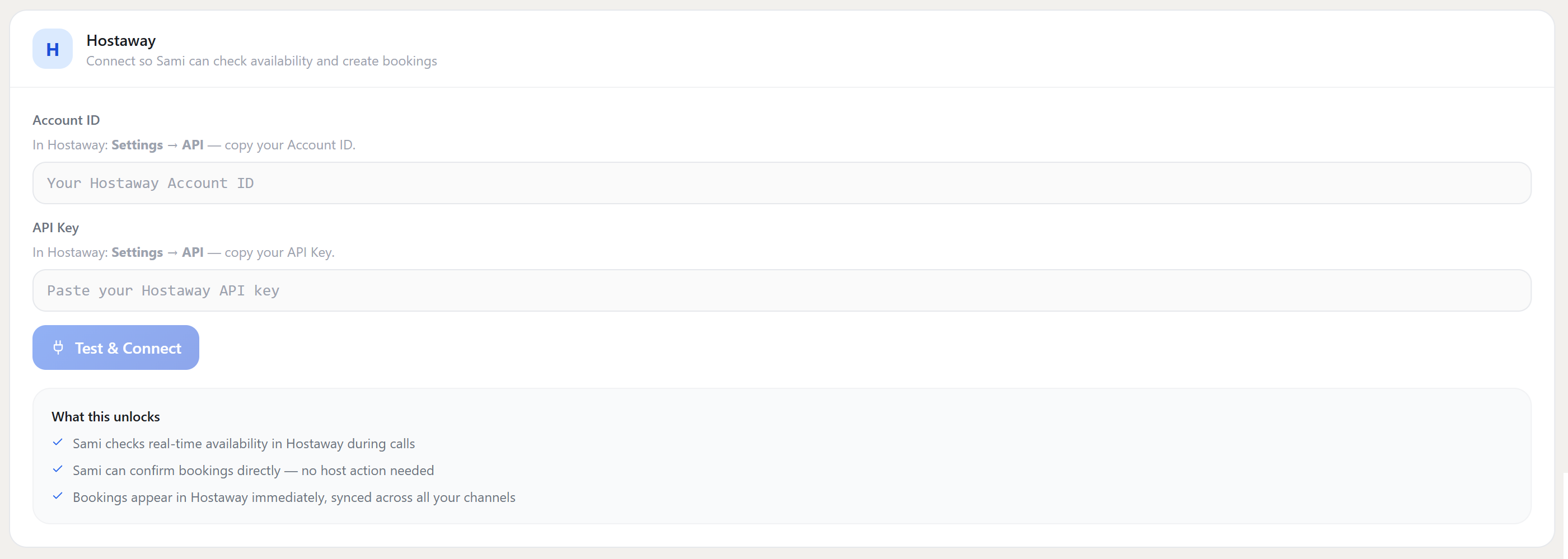
Hostaway uses two credentials — an Account ID and an API Key. Both come from the same place in Hostaway settings. Copy them, paste them into TheReach, and the integration is live.
-
Get your Hostaway Account ID and API Key.
In Hostaway, go to Settings → API. You'll find both your Account ID and API Key on that screen. Copy them both. -
Paste them into TheReach.
In your TheReach dashboard, go to Settings → Integrations → Hostaway. Enter your Account ID in the first field, your API Key in the second, and click Test & Connect. -
Done.
TheReach confirms the connection. Sami starts using live Hostaway availability data immediately for any incoming guest conversation.
What happens after you connect: Sami checks real-time availability in Hostaway during calls and chats. Confirmed bookings appear in Hostaway immediately — Hostaway handles the payment request to the guest via your existing processor. No new payment setup needed.
Who benefits most
The Hostaway + TheReach combination is most valuable for property managers who:
- Run 10+ properties and can't staff 24/7 human support cost-effectively
- Receive a significant share of direct booking enquiries via WhatsApp that don't come through OTAs
- Operate in multilingual markets (Spain, France, Italy) where guests often enquire in their own language
- Want to reduce OTA commission by capturing more direct bookings without adding staff
Connect Hostaway to TheReach
The integration is live. Log in to TheReach, go to Settings → Integrations → Hostaway, and enter your API credentials.
See all integrations →Want this workflow live this week?
Connect TheReach and start responding to inquiries and reviews in minutes.
Create accountFrequently Asked Questions
Yes. You can start with draft mode and switch to auto-reply once tone and quality are approved.
Ready to automate guest replies?
Launch in minutes and keep every review answered.
Start free