TheReach.ai + Smoobu: AI Guest Communication With Direct Booking Confirmation
Connect TheReach.ai to Smoobu so Sami can check live rates, confirm availability, and create bookings inside guest conversations — on WhatsApp, web chat, or voice.

Turn replies into bookings
Use instant guest messaging and AI-assisted tools to protect occupancy and revenue.
Get startedSmoobu is a popular channel manager for independent hosts and small portfolios in Europe. TheReach.ai sits on top and handles what Smoobu doesn't: guest conversations on WhatsApp, web chat, and phone — 24/7 — with live rate and availability data from your Smoobu account.
When a guest asks Sami about availability, Sami checks Smoobu in real time. When a guest confirms a booking, Sami creates it in Smoobu instantly. No manual entry, no back-and-forth.
What the Smoobu + TheReach integration does
- Real-time availability checks against your Smoobu calendar — no stale data, no overbooking risk
- Accurate rate quoting including seasonal pricing and minimum stay rules from Smoobu
- Booking creation directly in Smoobu when a guest confirms — Smoobu handles the payment request
- Multi-property support — if you have multiple listings in Smoobu, Sami knows which property the guest is asking about
- All channels — WhatsApp, website chat widget, forwarded phone calls — all use the same Smoobu data
How a guest conversation flows
Sami responds in the guest's language automatically. The reservation is created in Smoobu as soon as the guest confirms.
Guest support beyond bookings
Booking is one conversation. The rest of the stay generates many more — check-in codes, WiFi, parking, late arrivals, maintenance questions. Sami handles all of these from a knowledge base you configure per property, in the guest's language, around the clock.
For Smoobu users who typically run smaller portfolios, this means you stop being the 24/7 point of contact without hiring anyone. Sami handles the routine questions; genuine issues escalate to your phone immediately.
Setup: one key, done in 2 minutes
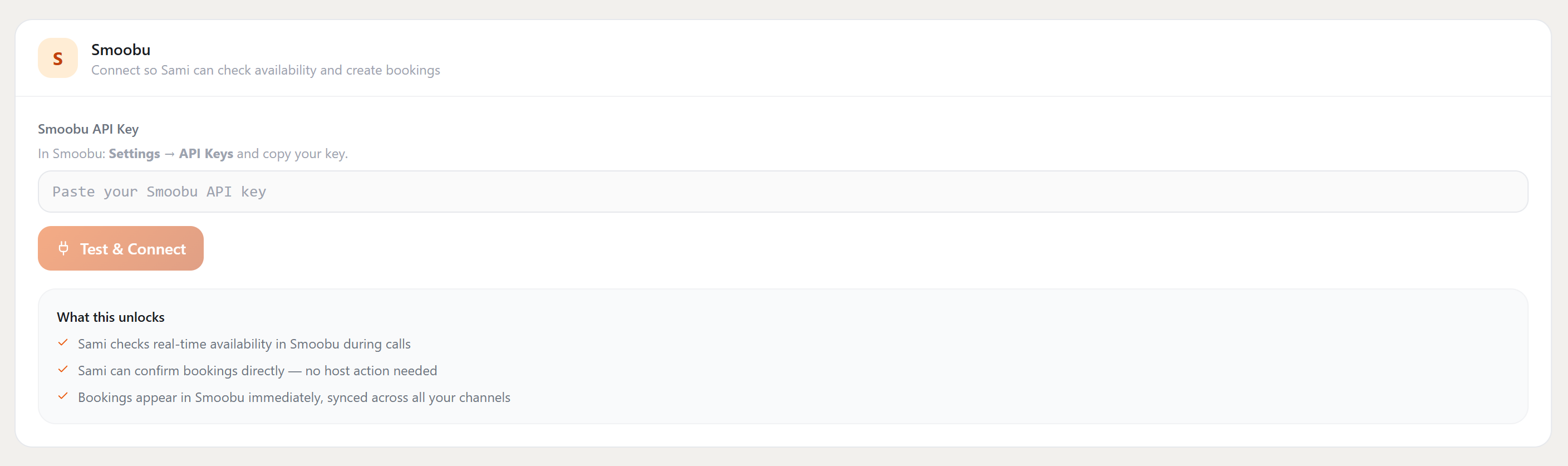
Smoobu uses a single API key. Copy it from Smoobu settings, paste it into TheReach — that's the entire setup. No webhooks, no extra configuration, no technical knowledge required.
-
Get your Smoobu API key.
In Smoobu, go to Settings → API Keys and copy your key. If you don't have one yet, click "Create API Key" on that screen. -
Paste it into TheReach.
In your TheReach dashboard, go to Settings → Integrations → Smoobu. Paste your API key into the input field and click Test & Connect. -
Done.
TheReach confirms the connection. Sami is immediately ready to check live Smoobu availability and create bookings from any guest conversation.
What happens after you connect: Sami checks real-time availability and rates in Smoobu during every guest conversation. When a guest confirms, Sami creates the reservation — Smoobu sends the payment link to the guest automatically via your existing setup.
Connect Smoobu to TheReach
Log in to TheReach, go to Settings → Integrations → Smoobu, and enter your API key. Setup takes under 5 minutes.
See all integrations →Want this workflow live this week?
Connect TheReach and start responding to inquiries and reviews in minutes.
Create accountFrequently Asked Questions
Yes. You can start with draft mode and switch to auto-reply once tone and quality are approved.
Ready to automate guest replies?
Launch in minutes and keep every review answered.
Start free