TheReach.ai + Beds24: AI Guest Communication With Live Availability
Connect TheReach.ai to Beds24 and let Sami check real-time availability, quote rates, and create bookings directly inside guest conversations — on WhatsApp, web chat, or phone.

Turn replies into bookings
Use instant guest messaging and AI-assisted tools to protect occupancy and revenue.
Get startedBeds24 manages your calendars, rates, and channel distribution. TheReach.ai handles the guest conversation — WhatsApp, web chat, and phone calls. Connect the two, and Sami can check live availability in Beds24, quote accurate rates, and create confirmed bookings without you touching anything.
The integration is live and takes under 5 minutes to set up — one API token, no webhooks, no engineering.
What the Beds24 + TheReach integration does
Once connected, Sami has read and write access to your Beds24 account. In practice, this means:
- Live availability checks — when a guest asks "do you have anything for 3 nights from 15 August?", Sami queries Beds24 in real time, not a cached snapshot
- Accurate rate quoting — Sami quotes the exact nightly rate from Beds24 including minimum stay rules and seasonal pricing
- Direct booking creation — Sami creates the reservation in Beds24 inside the conversation. No back-and-forth, no manual entry
- Multi-property support — if you manage multiple properties in Beds24, Sami knows which property the guest is asking about and queries the right one
- All channels — the same availability logic runs whether the guest is on WhatsApp, web chat, or calling your forwarded number
The full guest booking flow
Guest sends a message
"Hi, do you have availability for 4 nights from 20 July? How much would it be?"
Sami queries Beds24
Checks live availability and rates for those exact dates — under 2 seconds.
Sami quotes and confirms
"Yes, available! 4 nights from 20 July comes to €640 total (€160/night). Shall I confirm the booking?"
Guest confirms
Sami creates the reservation in Beds24 immediately.
Beds24 handles payment
Beds24 sends its standard payment request to the guest via email. You collect payment through your existing processor.
How payment works
TheReach creates the booking. Beds24 collects the money. You need Stripe, PayPal, or your Beds24-compatible payment processor already configured in your Beds24 account — TheReach doesn't handle payments and doesn't require any new payment setup.
When Sami creates a reservation, Beds24 automatically sends your standard payment request email to the guest. The guest pays through the link they already receive from Beds24. Nothing changes on the payment side.
Setup: it's just a paste
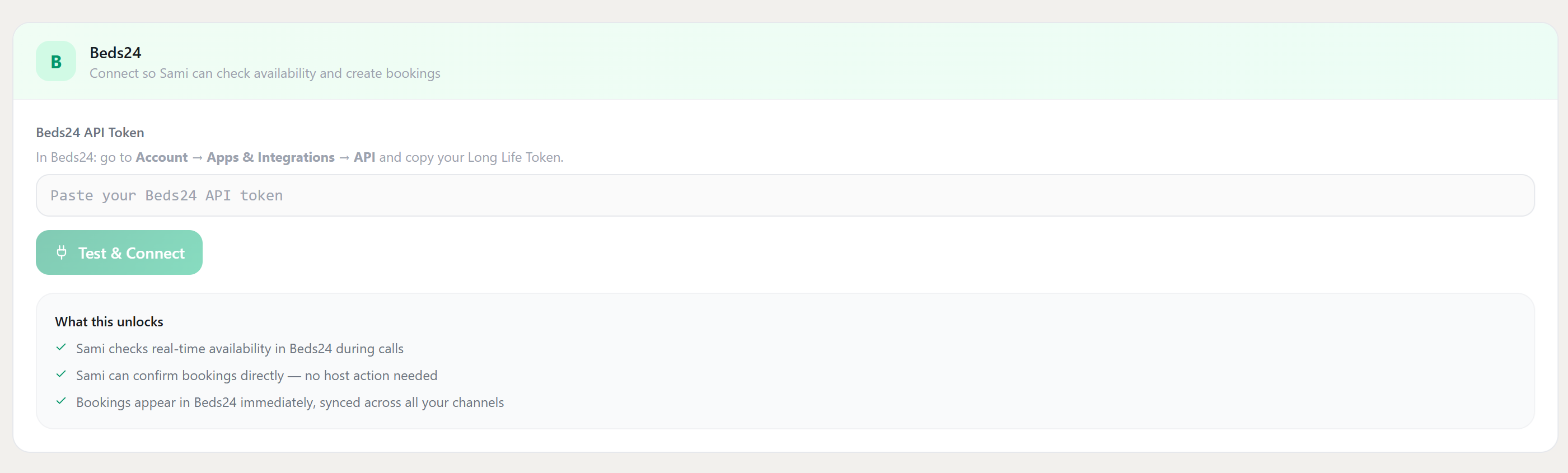
The whole thing takes under 3 minutes. There's no webhook to configure, no developer needed — literally just copy a token from Beds24 and paste it into TheReach.
-
Get your Beds24 Long Life Token.
In Beds24, go to Account → Apps & Integrations → API and copy your Long Life Token. It's a long string — just copy the whole thing. -
Paste it into TheReach.
In your TheReach dashboard, go to Settings → Integrations → Beds24. You'll see a single input field — paste your token there and click Test & Connect. -
Done.
TheReach verifies the token and confirms which Beds24 property is connected. Sami immediately starts checking live availability from your Beds24 calendar for any new guest conversations.
What happens after you connect: Sami checks availability in Beds24 during calls and chats. When a guest confirms a booking, Sami creates the reservation in Beds24 immediately — and Beds24 sends your standard payment email to the guest automatically.
No PMS yet? Sami can still handle guest questions and handle check-in support — it just redirects booking requests to your Airbnb or Booking.com listing instead of creating reservations directly.
Use cases by property type
| Property type | Highest-value use |
|---|---|
| Single vacation rental | Capture direct booking enquiries that arrive via WhatsApp outside office hours |
| Multi-property portfolio (5–20) | Route each guest to the right property, check availability across the portfolio, and confirm without staff involvement |
| Rural hotel / aparthotel | Handle multilingual availability enquiries from international guests 24/7 without a front desk team on evenings and weekends |
Connect Beds24 to TheReach
The integration is live. Log in to TheReach, go to Settings → Integrations → Beds24, and paste your API key. Takes under 5 minutes.
See all integrations →Want this workflow live this week?
Connect TheReach and start responding to inquiries and reviews in minutes.
Create accountFrequently Asked Questions
Yes. You can start with draft mode and switch to auto-reply once tone and quality are approved.
Ready to automate guest replies?
Launch in minutes and keep every review answered.
Start free