Claude + TheReach.ai via MCP: What Property Managers Can Actually Do
TheReach.ai connects to Claude Desktop via MCP, giving Claude live access to your calls, chats, leads, and knowledge base. Here's what that unlocks for property managers.

Turn replies into bookings
Use instant guest messaging and AI-assisted tools to protect occupancy and revenue.
Get startedMost AI tools for vacation rentals answer guests. TheReach.ai does that — but it also connects to Claude Desktop via MCP, which means Claude can answer you: questions about your business that normally require hours of digging through call logs, chat history, and booking data.
MCP (Model Context Protocol) is an open standard that lets Claude Desktop talk to external services using your real data. Once your TheReach account is connected, Claude has access to your actual calls, chats, leads, and knowledge base — not a demo dataset, your live data.
Watch: Sami in action (90 seconds)
What MCP actually means for property managers
Standard AI chatbots know what you tell them. Claude via MCP knows what actually happened. It can read your call transcripts, browse your chat history, see which knowledge base entries guests asked about and didn't find answers to, and tell you which properties generate the most unresolved conversations.
That's the difference between a tool that talks to guests and a tool that helps you understand your business. Most property managers with 5+ properties are sitting on weeks of conversation data they've never analysed — because analysing it manually takes time no one has.
Claude doesn't just automate communication. Connected via MCP, it reads your operation and tells you what to fix.
Real use cases — questions Claude can answer with your data
These are the kinds of questions property managers ask Claude once the MCP connection is live:
None of those answers come from a pre-built dashboard. Claude reads your actual conversation data and synthesises it in plain language — which means you can ask follow-up questions, drill into specific properties, and get answers tailored to your situation rather than generic benchmarks.
Why this is different from standard AI dashboards
Most property management tools offer some version of analytics: call volume charts, response time averages, booking conversion funnels. Those are useful, but they answer the questions the product designer anticipated.
Claude via MCP answers the questions you think of — including ones no dashboard was built for. "Why are guests from France converting at half the rate of guests from Germany?" or "Has anything changed in guest tone over the last 3 months?" These are business intelligence questions. They require reasoning over data, not just aggregation.
| Standard dashboard | Claude via MCP | |
|---|---|---|
| Questions you can ask | What the tool was built to show | Anything, in plain language |
| Output format | Charts, tables, averages | Explanations, diagnoses, recommendations |
| Follow-up questions | Apply a filter, re-run the report | Just ask |
| Actionability | You interpret and decide | Claude tells you what to fix and can draft the fix |
How to connect — no config files, no API keys
This is a browser-based OAuth flow. You copy one URL, paste it into Claude Desktop, log in with your TheReach account, and you're done. No JSON files to edit, no environment variables, no engineering.
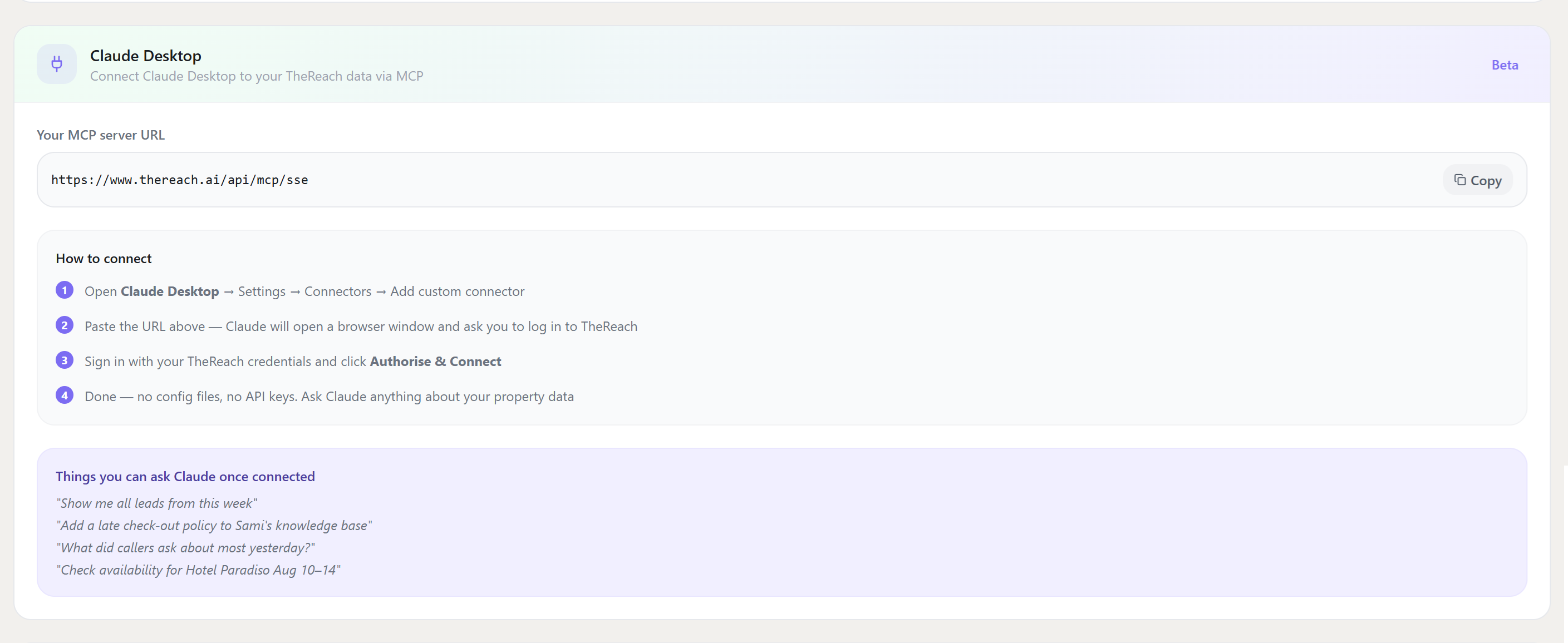
- Download Claude Desktop from Anthropic — it's free, available for Mac and Windows. No Claude subscription required.
-
Copy your MCP URL from TheReach.
In your TheReach dashboard, go to Settings → Integrations. You'll see a panel labelled "Claude MCP" with your personal MCP server URL — click to copy it. -
Add it to Claude Desktop.
In Claude Desktop, go to Settings → Connectors → Add custom connector and paste your URL. Claude opens a browser window automatically. -
Sign in and authorise.
Log in with your TheReach credentials and click Authorise & Connect. Done — Claude now has live access to your property data.
Currently in beta. Your MCP URL is unique to your account — treat it like a password. Claude Desktop is a free download from Anthropic; you do not need a paid Claude subscription to use MCP connections.
Who benefits most
The MCP integration is most useful if you:
- Manage 10+ properties and want portfolio-level insights without hiring an analyst
- Have seasonal patterns you suspect exist but can't easily confirm from raw data
- Want to know why specific properties underperform vs. just knowing that they do
- Are making listing or pricing decisions and want them backed by your actual guest conversation data
- Work with multiple languages and want to understand if language affects booking conversion
If you have one property and review every conversation manually, you probably don't need this yet. If you're scaling and the conversations are outpacing your ability to read them, MCP is where the leverage is.
Get your MCP URL
Sign in to TheReach, go to Settings → Integrations, and copy your MCP URL. The connection takes under 5 minutes.
See all integrations →Want this workflow live this week?
Connect TheReach and start responding to inquiries and reviews in minutes.
Create accountFrequently Asked Questions
Yes. You can start with draft mode and switch to auto-reply once tone and quality are approved.
Ready to automate guest replies?
Launch in minutes and keep every review answered.
Start free